> ## Documentation Index
> Fetch the complete documentation index at: https://visual-layer-mintlify-changelog-1777594172.mintlify.site/llms.txt
> Use this file to discover all available pages before exploring further.

# Navigating Visual Layer

> Understand Visual Layer's interface structure and navigation patterns.

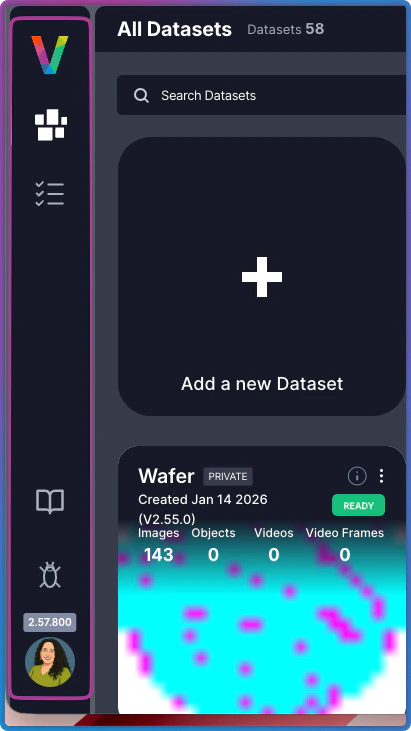
The **Navigation Panel** is persistent across both areas of Visual Layer, providing access to core platform features throughout your session.

<Frame>
  <img src="https://mintcdn.com/visual-layer-mintlify-changelog-1777594172/POz3LhRO2-PoUpuI/images/nav-panel.png?fit=max&auto=format&n=POz3LhRO2-PoUpuI&q=85&s=c87c9697cf8182147f3d74a742de394e" alt="Navigation Panel" width="411" height="731" data-path="images/nav-panel.png" />
</Frame>

<div className="integrations-table">
  | Icon/Option                                                                                                                                                                                                                                                                                                                                                                                                                                                                                                                                                                                                                                                                                                                                                                                                                                                                                                                                                                                                                                                                                                                                                                                                                                                                                                                                                                                                                                                                                                                                                                                                                                                                                                | Name               | Description                                                                                                                                                                               |
  | ---------------------------------------------------------------------------------------------------------------------------------------------------------------------------------------------------------------------------------------------------------------------------------------------------------------------------------------------------------------------------------------------------------------------------------------------------------------------------------------------------------------------------------------------------------------------------------------------------------------------------------------------------------------------------------------------------------------------------------------------------------------------------------------------------------------------------------------------------------------------------------------------------------------------------------------------------------------------------------------------------------------------------------------------------------------------------------------------------------------------------------------------------------------------------------------------------------------------------------------------------------------------------------------------------------------------------------------------------------------------------------------------------------------------------------------------------------------------------------------------------------------------------------------------------------------------------------------------------------------------------------------------------------------------------------------------------------- | ------------------ | ----------------------------------------------------------------------------------------------------------------------------------------------------------------------------------------- |
  | <img src="https://mintcdn.com/visual-layer-mintlify-changelog-1777594172/POz3LhRO2-PoUpuI/images/dataset-inventory-icon.png?fit=max&auto=format&n=POz3LhRO2-PoUpuI&q=85&s=5dfb4d6024a1d40b75765c0d3537b1b4" className="img-marker" alt="My Datasets icon" width="100" height="100" data-path="images/dataset-inventory-icon.png" /> | **My Datasets**    | Return to the Dataset Inventory home page (current view)                                                                                                                                  |
  | <img src="https://mintcdn.com/visual-layer-mintlify-changelog-1777594172/POz3LhRO2-PoUpuI/images/task-manager-icon.png?fit=max&auto=format&n=POz3LhRO2-PoUpuI&q=85&s=b4deefedf0c0c95f17557c72bf8ecd00" className="img-marker" alt="Task Manager icon" width="42" height="42" data-path="images/task-manager-icon.png" />                                            | **Task Manager**   | Monitor and manage all active tasks, jobs, and processing workflows                                                                                                                       |
  | <Icon icon="book-open" size={22} />                                                                                                                                                                                                                                                                                                                                                                                                                                                                                                                                                                                                                                                                                                                                                                                                                                                                                                                                                                                                                                                                                                                                                                                                                                                                                                                                                                                                                                                                                                                                                                                                                                                                        | **Help Resources** | Access user guides, API references, and tutorials                                                                                                                                         |
  | **Bug Report**                                                                                                                                                                                                                                                                                                                                                                                                                                                                                                                                                                                                                                                                                                                                                                                                                                                                                                                                                                                                                                                                                                                                                                                                                                                                                                                                                                                                                                                                                                                                                                                                                                                                                             | **Feedback**       | Report issues or provide feedback to the Visual Layer team                                                                                                                                |
  | <img src="https://mintcdn.com/visual-layer-mintlify-changelog-1777594172/POz3LhRO2-PoUpuI/images/avatar-icon.png?fit=max&auto=format&n=POz3LhRO2-PoUpuI&q=85&s=7c64ae02e46774cf68d28cbb6d27843c" className="img-marker" alt="Personal Info avatar icon" width="86" height="86" data-path="images/avatar-icon.png" />                                                                                    | **Personal Info**  | Click your avatar to view image usage limits (trial accounts default to 10,000 images), subscription status, and active plan details. Also access the light/dark mode toggle and log out. |
</div>

Together, these options support navigation across Visual Layer's two primary interface areas.

## Interface Areas

Visual Layer is built around two primary areas. To navigate between them:

1. **Start** at the [**Dataset Inventory**](/docs/quick-start/dataset-inventory-ux) (home page)
2. **Select** a dataset to analyze
3. **Work** in the [**Dataset Exploration View**](/docs/quick-start/dataset-exploration-ux)
4. **Return** to the [**Dataset Inventory**](/docs/quick-start/dataset-inventory-ux) to switch datasets or create new ones

## Dataset Inventory

The **Dataset Inventory** is your home page, displaying all datasets in a centralized view. It handles dataset creation, organization, and high-level management. You land here when you first log in and return to it when switching between datasets.

## Dataset Exploration View

The **Dataset Exploration View** is your primary workspace for analyzing individual datasets. It provides tools for exploring clusters, applying filters, running searches, and managing data quality. Open any dataset from the **Dataset Inventory** to enter this view.

## Next Steps

<CardGroup cols={2}>
  <Card title="Dataset Inventory" icon="layout-dashboard" href="/docs/quick-start/dataset-inventory-ux">
    Learn about the home page interface and dataset management
  </Card>

  <Card title="Dataset Exploration View" icon="search" href="/docs/quick-start/dataset-exploration-ux">
    Interface reference for the dataset analysis workspace
  </Card>
</CardGroup>
